The growth of web applications in educational institutions has made access control management increasingly complex and time-consuming. At Nueva Vizcaya State University (NVSU), the need to log in to multiple web applications with different credentials leads to a fragmented user experience and administrative burden. This study explores the implementation of Single Sign-On (SSO) using Active Directory Federation Services (AD FS) to streamline access and enhance security across NVSU’s web applications. AD FS allows users to authenticate with a single set of credentials, reducing password fatigue and improving user experience. Additionally, AD FS supports various authentication protocols, ensuring compliance with data protection regulations and industry standards. Literature highlights the benefits of SSO with AD FS, including enhanced security, reduced administrative overhead, and improved user satisfaction. However, challenges such as infrastructure complexity, integration with existing systems, and user adoption are also noted. This research aims to implement SSO using AD FS at NVSU and evaluates its impact on authentication security, user experience, and administrative efficiency. A mixed-methods approach, including surveys, interviews, technical assessments, and system testing, was used. The study followed the PPDIOO (Prepare, Plan, Design, Implement, Operate, Optimize) methodology for design and configuration. The results indicate that while the implementation of AD FS for SSO at NVSU posed challenges, it significantly improved security, user experience, and reduced administrative tasks. Recommendations for successful implementation and management are provided based on these findings. This research contributes to understanding the practical benefits and challenges of implementing SSO with AD FS in a university setting, offering valuable insights for similar institutions seeking to enhance their digital infrastructure.
As the number of web applications used in educational institutions continues to grow, managing access control becomes increasingly complex and time-consuming for both users and administrators. At Nueva Vizcaya State University (NVSU), students, faculty, and staff must log in to multiple web applications using different usernames and passwords, leading to a fragmented user experience and additional administrative burden.
To address these challenges, NVSU can implement a Single Sign-On (SSO) solution using Active Directory Federation Services (AD FS) to streamline access to its web applications. AD FS enables users to authenticate across multiple web applications using a single set of credentials, reducing password fatigue and improving security. Furthermore, AD FS supports various authentication protocols and enhances compliance with data protection regulations and industry-standard security practices.
Research has shown that implementing SSO with AD FS provides significant benefits. Microsoft documentation highlights reduced password fatigue, centralized access control, and streamlined authentication management as key advantages 1. Studies in various sectors, including healthcare and higher education, have demonstrated that SSO with AD FS improves security, enhances user experience, and reduces administrative overhead 2 3. However, researchers also emphasize the importance of proper planning and configuration to address potential compatibility issues 4.
The main objective of this research is to implement SSO using AD FS to enhance authentication and security in NVSU web applications. Specifically, the study aims to:
1. Examine the challenges and considerations involved in implementing AD FS for SSO at NVSU.
2. Evaluate the benefits of SSO with AD FS, such as increased security, reduced password fatigue, and simplified access management.
3. Analyze the impact of SSO implementation on user experience at NVSU.
4. Assess the effectiveness of SSO with AD FS in enhancing authentication and security.
5. Provide recommendations for the successful implementation and management of SSO with AD FS based on study findings.
By implementing SSO with AD FS, NVSU can improve user experience, enhance security, and reduce administrative workload, making it a valuable addition to the university’s IT infrastructure.
The study employed a mixed-methods approach, combining qualitative and quantitative research through surveys, interviews, technical assessments, and system testing. It evaluated SSO implementation with AD FS in NVSU’s web applications, focusing on authentication, security, and user satisfaction.
The methodology included a literature review, requirements gathering, system design using Cisco’s PPDIOO framework, and rigorous functional and security testing. Post-implementation evaluation and user feedback were also collected to refine the system for optimal performance.
2.1. Literature ReviewA thorough review on relevant literature on SSO with AD FS and its implementation in web applications was conducted. This involved gathering and analyzing existing research studies, case studies, and technical documentation related to SSO with AD FS.
2.2. Requirements GatheringUse of survey form was utilized to identify the specific requirements and goals for implementing SSO with AD FS in NVSU's web applications. Also, series of interviews and observations were conducted to understand the stakeholders’ needs and identify their technical limitations or compatibility issues.
2.3. Design and ConfigurationPPDIOO stands for Prepare, Plan, Design, Implement, Operate, and Optimize. PPDIOO is a Cisco methodology that defines the continuous life-cycle of services required for a network, CISCO (2024). For the implemention of SSO with AD FS in NVSU's web applications, Windows Servers necessary components are installed to allow AD FS services and web application to function.
2.4. Testing and EvaluationFunctional and non-functional testing of the SSO implementation were conducted. Also, in this phase, was the evaluation of the system's performance, reliability, and security, to make any necessary adjustments based on the results.
Once the SSO implementation has been fully tested and evaluated, training and support to end-users was ensured to effectively use the new system for a more productive environment.
After deployment of the system, comments and feedback were gathered from end-users to identify any areas for improvement, make any necessary adjustments for continued success and user satisfaction.
This section offers a clear and insightful analysis, demonstrating how the findings contribute to the research questions posed, addressing any unexpected outcomes, and suggesting directions for future research.
3.1. As to the Challenges and Considerations Involved In Implementing AD FS for SSO in Web Applications Used by NVSU, the Following Were Identified• Infrastructure Complexity: AD FS requires a complex infrastructure setup, including multiple servers, certificates, and network configurations. Designing and implementing this infrastructure can be challenging, especially in large-scale university environments with diverse applications and user bases. 1
• Integration with Existing Systems: NVSU has a wide range of applications and systems in use, including legacy systems. Integrating these diverse systems with AD FS for SSO may require customization and development work to ensure smooth interoperability. (Microsoft, n.d.)
• Identity Management and Provisioning: NVSU complex identity management and provisioning processes, including student, faculty, and staff accounts. AD FS implementation must align with these processes to ensure accurate and timely provisioning and deprovisioning of user accounts. 5
• User Experience and Adoption: AD FS implementation should strive to provide a seamless and user-friendly SSO experience. This includes user training, clear documentation, and troubleshooting to ensure smooth adoption of the system by NVSU users. 6.
• Security and Compliance: Protecting user identities and ensuring compliance with data privacy regulations are critical considerations. AD FS should be configured with appropriate security measures, such as secure certificate management, robust authentication methods, and adherence to Philippines' Data Privacy Act. 7
• Scalability and High Availability: NVSU has a large user population and heavy traffic on its web applications. AD FS implementation must be designed to handle scalability requirements and ensure high availability to prevent service disruptions and accommodate peak usage times. 1
By addressing these challenges and considerations, implementing AD FS for SSO in web applications for NVSU provides seamless and secure authentication experience for users.
3.2. Evaluate the Benefits of Implementing SSO with AD FS in NVSU web Applications, Including Increased Security, Reduced Password Fatigue, and Simplified Access ManagementThe dataset contains responses from individuals to a survey about their experiences with web applications, password management, and security concerns. It includes demographic information, usage habits, attitudes towards SSO, and perceived benefits and challenges of SSO implementation.
User Behavior and Challenges
• Password Management: Table 1 shows significant portion of respondents (65%) experience difficulties managing and remembering passwords, with many resorting to writing them down or reusing passwords due to fatigue, 45% and 61%, respectively.
• Security Concerns: A majority (63%) express concern about the security of their credentials when using web applications, as shown in the table above.
• Web Application Usage: Table 2 shows that most respondents use 3-5 web applications regularly, requiring them to manage multiple usernames and passwords.
Attitudes towards SSO
• Awareness: A majority of users are aware of SSO, with 39 out of 46 respondents (85%) either strongly agreeing or agreeing that they are familiar with it. However, a small portion (7 respondents or 15%) are neutral or unaware, indicating the need for additional education and awareness efforts.
• Willingness to Use: Users show a strong inclination to adopt SSO, with 43 out of 46 respondents (93%) expressing willingness to use web applications with SSO. Only a small number (3 respondents or 7%) are neutral or hesitant, suggesting that most users recognize its value and are open to implementation.
• Perceived Benefits:
Users strongly perceive SSO as beneficial:
• Security: 43 out of 46 (93%) believe SSO enhances security.
• Password Fatigue Reduction: 43 out of 46 (93%) agree that SSO minimizes password-related stress.
• Simplified Authentication: 44 out of 46 (96%) see SSO as an easier way to log in.
Overall, these findings highlight high awareness, strong willingness to adopt, and a clear recognition of SSO’s security and usability benefits, making it a viable solution for NVSU’s web applications.
Potential for SSO Implementation
The data suggests a strong potential for implementing SSO in NVSU web applications. Most respondent experience challenges with password management and express security concerns, which SSO can effectively address. Additionally, the positive attitudes towards SSO and its perceived benefits indicate a high level of user acceptance.
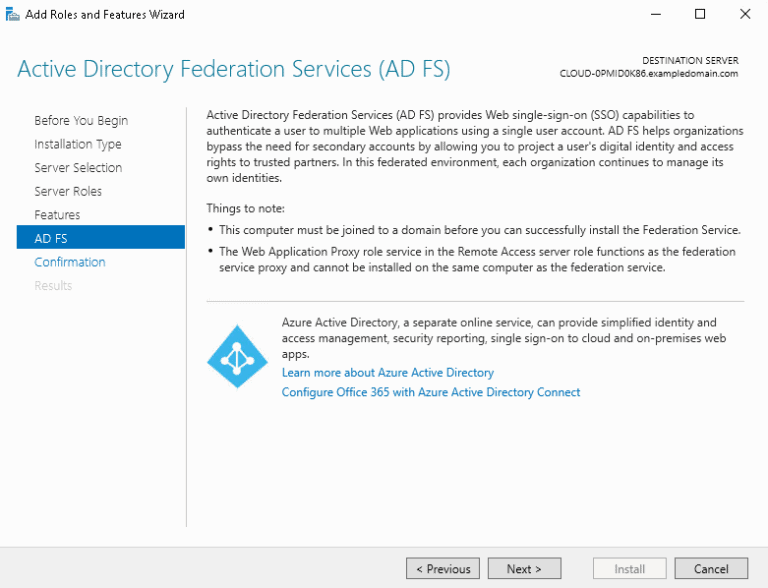
3.3. Analyzing the Data Gathered on the Use of NVSU Web Applications without SSO Prompt the Researchers to Conduct this Study. Figures below Describes how SSO with AD FS WorksFigure 1 shows the installation wizard of AD FS under Windows 2016 Server on a virtual machine.
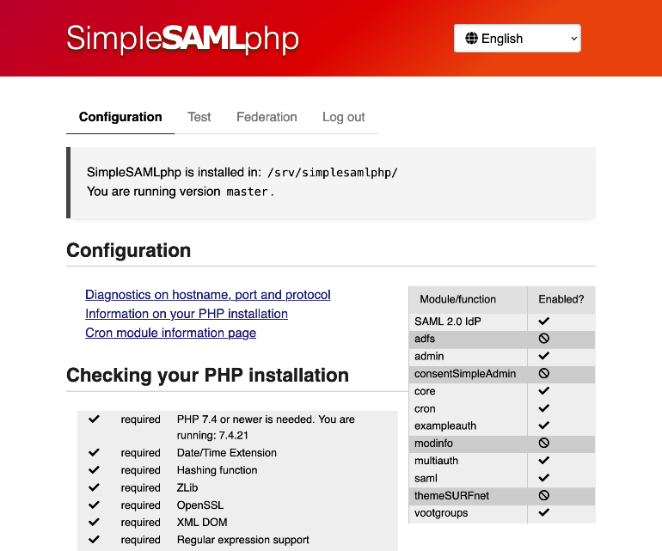
Figure 2 shows the SimpleSAML Installation wizard. SimpleSAMLphp SimpleSAMLphp is an open-source PHP authentication application that provides support for SAML 2.0 as a Service Provider (SP) or Identity Provider (IdP).
Simplified Authentication Process: SSO with AD FS enables users to log in to multiple NVSU web applications using a single set of credentials, eliminating the need to remember multiple usernames and passwords.
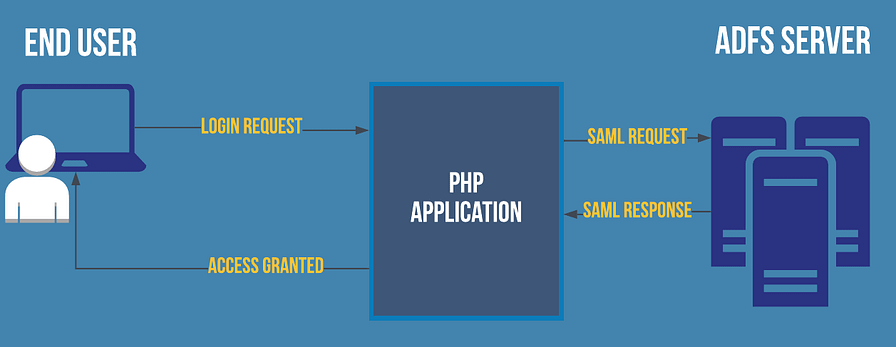
Figure 3 illustrates the token exchange process, streamlining authentication and reducing the need for multiple accounts 8. SAML, an XML-based security protocol, enables Web SSO by allowing users to access multiple applications with a single identity, enhancing security and convenience 9.
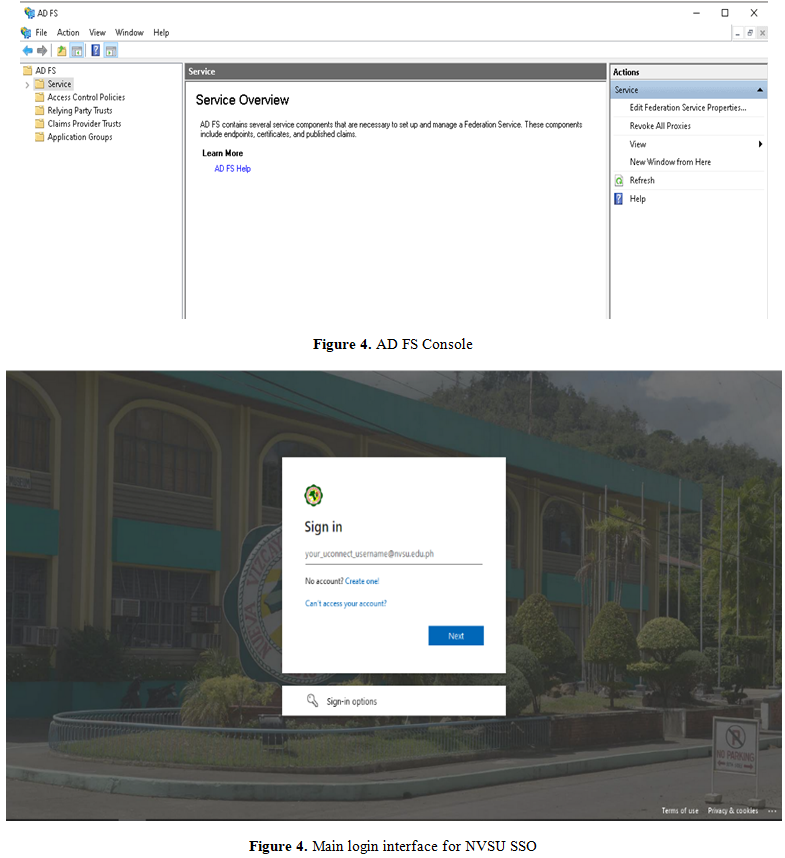
Seamless Navigation between Applications: Once authenticated through AD FS, users can seamlessly access NVSU web applications without re-entering credentials, enhancing efficiency and satisfaction 10. Figure 4 displays the AD FS console, which manages trusted applications for SSO 11.
Improved Productivity and Efficiency: With SSO implemented through AD FS, users can quickly access multiple NVSU web applications, leading to increased productivity. Users can switch between applications seamlessly, reducing interruptions and allowing them to focus on their tasks. 12
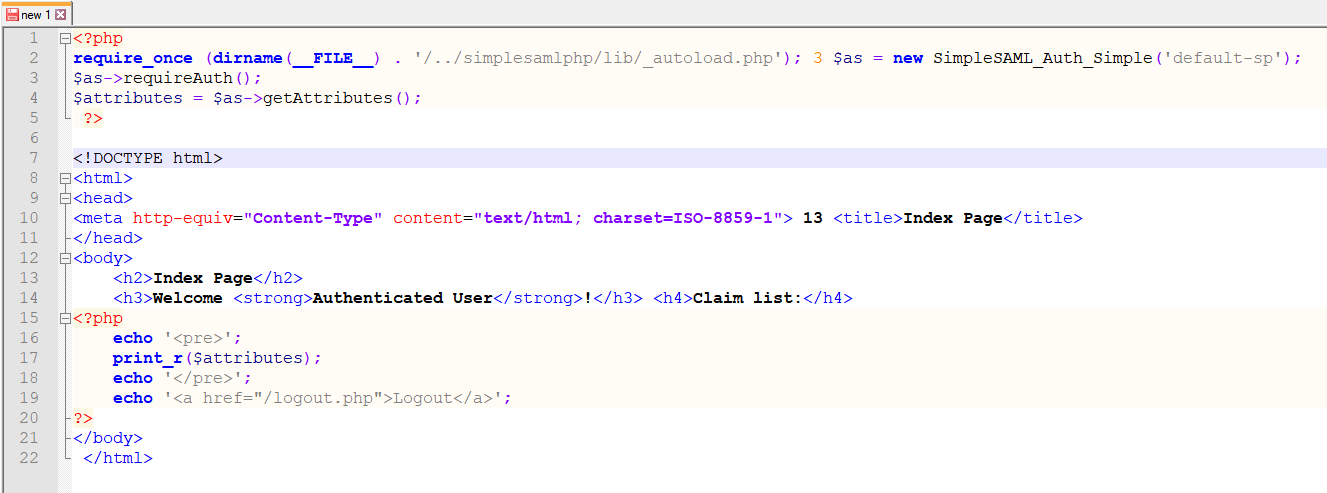
Consistent User Interface: AD FS can provide a consistent user interface for authentication across different NVSU web applications. Figure 4 shows the uniformity that contributes to a cohesive user experience, reducing confusion and increasing familiarity. 13. Additionally, Figure 5 shows a code snippet for basic implementation of AD FS SSO using PHP. 14


Support and Documentation: Proper support mechanisms and documentation should be provided to help users understand the SSO process, troubleshoot any issues, and access additional resources. Clear instructions and readily available support contribute to a positive user experience. 15
Based on the findings of the study, Implementing Single Sign-On (SSO) with Active Directory Federation Services (AD FS) in NVSU web applications requires careful planning and execution. These are the recommendations for a successful implementation and management:
Thorough Planning and Requirements Gathering. Visibly define the goals and requirements of the SSO implementation and consider the specific needs and workflows of NVSU web applications. Identify the applications that will participate in SSO and ensure they are compatible with AD FS.
Design an Effective Architecture. Design an AD FS infrastructure that meets scalability, availability, and security requirements. Consider implementing an available AD FS deployment with load balancing and redundancy to ensure uninterrupted service. Virtualization is also recommended to fully utilize the hardware capabilities.
Establish Trust Relationships. Establish trust relationships with identity providers (IdPs) or partners, both within and outside NVSU, to enable secure federation. Verify and validate the security practices and protocols of the participating IdPs to ensure a secure authentication process. Additionally, a policy must be set in place to ensure that the NVSU net usage policy as well as the data privacy protection are met.
Implement Robust Security Measures. Utilize Secure Sockets Layer (SSL) or Transport Layer Security (TLS) to secure communication between web applications and AD FS servers. Enable strong authentication methods, such as multi-factor authentication (MFA), to enhance security and protect against unauthorized access.
User Experience and Support. Design intuitive and user-friendly interface for the SSO login process to ensure a seamless user experience. This interface will be used as the default login page for all NVSU web applications.
Monitoring and Maintenance. Implement monitoring tools and mechanisms to track AD FS health, performance, and authentication events. Regularly update and patch AD FS servers to address security vulnerabilities and ensure compliance with the latest standards.
Continuous Improvement and Feedback System. Collect feedback from users and IT administrators to identify areas for improvement and address any issues. Stay updated from advancements in SSO technologies and best practices to constantly enhance the SSO implementation.
Documentation and Knowledge Sharing. Document the SSO implementation process, including configuration settings, trust relationships, and troubleshooting procedures. Establish knowledge sharing practices within the MIS (Management Information Systems) group to ensure continuity and facilitate future maintenance and enhancements.
Based on the implementation of Single Sign-On (SSO) with Active Directory Federation Services (AD FS) for enhanced authentication and security in Nueva Vizcaya State University (NVSU) web applications, several conclusions have drawn:
1. Enhanced Authentication: Implementing SSO with AD FS has improved the authentication process for NVSU web applications. Users can conveniently access multiple applications with a single set of credentials, reducing the need to remember and manage multiple usernames and passwords. This streamlining of authentication enhances user experience and productivity.
2. Improved Security: The implementation of SSO with AD FS has enhanced the security of NVSU web applications. By consolidating authentication and authorization processes under a central identity provider, AD FS enables consistent enforcement of security policies across applications. This reduces the risk of weak passwords, password reuse, and unauthorized access. Additionally, the integration of strong authentication methods, such as multi-factor authentication (MFA), further enhances security.
3. Reduced Password Fatigue: SSO implementation has significantly reduced password fatigue among NVSU users. With SSO, users no longer need to remember and manage multiple usernames and passwords for various applications. This reduces the likelihood of weak passwords and password-related vulnerabilities, improving overall security.
4. Simplified Access Management: AD FS-based SSO implementation has simplified access management for NVSU's IT team. Administrators can centrally manage user access rights, granting or revoking privileges across multiple applications from a specific location. This centralized approach enhances security, reduces administrative overhead, and ensures timely account termination when needed.
5. Positive User Experience: The implementation of SSO with AD FS has contributed to a positive user experience for NVSU web applications. Users appreciate the streamlined authentication process, reduced password fatigue, and seamless navigation between different applications without the need for repeated login prompts. This improved user experience boosts productivity and user satisfaction.
6. Continuous Improvement: To maintain the benefits of SSO implementation, it is crucial for NVSU to continuously monitor and update the AD FS infrastructure. Regular monitoring helps identify potential security incidents, ensures system availability, and facilitates prompt response to any emerging vulnerabilities. Ongoing evaluation and feedback gathering from users and IT administrators allow for continuous improvement and optimization of the SSO implementation.
In overall, implementing SSO with AD FS in NVSU's web applications has resulted in enhanced authentication, improved security, reduced password fatigue, simplified access management, and a positive user experience. By leveraging the centralized identity provider and strong authentication methods, NVSU can provide a secure and efficient access control system for its web applications.
We would like to express our sincere gratitude to everyone who contributed to the successful implementation of Single Sign-On (SSO) with Active Directory Federation Services (AD FS) for enhanced authentication and security in the web applications of the Nueva Vizcaya State University especially to Dr. Wilfredo A. Dumale, our University President, for his unwavering support and leadership.
Thank you, Dr. Dumale, for your guidance and commitment to advancing our university's digital infrastructure.
Our deepest appreciation goes to the CSITIS Departments for their technical expertise and dedication throughout the project. Their hard work and commitment were crucial in ensuring a seamless integration and robust security framework.
We also extend our thanks to the administration, including Dr. Jonar I. Yago, Dr. Jessie Pascual P. Bitog, and Dr. Lori Shayne A. Busa for their unwavering support and for providing the necessary resources to make this project possible. Their vision for a more secure and efficient digital infrastructure has been a driving force behind this initiative.
Lastly, we are grateful to the faculty, staff, and students of the Nueva Vizcaya State University for their patience and cooperation during the implementation process. Their understanding and adaptability were invaluable to our team.
| [1] | Microsoft, "Active Directory Federation Services Overview," Microsoft Documentation, 2021. | ||
| In article | |||
| [2] | L. Ehrenhalt, "SSO in Healthcare: The Benefits of Single Sign-On Authentication," TechTarget, 2018. | ||
| In article | |||
| [3] | A. A. Azeez and E. Sundararajan, "Single Sign-On Authentication for University Web Applications Using Active Directory Federation Services," International Journal of Computer Applications, vol. 127, no. 1, pp. 1–5, July 2015. | ||
| In article | |||
| [4] | A. Dumitrascu, C. Zaharia, C. Popescu, and G. Carutasu, "Analysis of Active Directory Federation Services in a Multiplatform Environment," Procedia Computer Science, vol. 91, pp. 1002–1009, 2016. | ||
| In article | |||
| [5] | R. Barnes and M. Gozali, "Active Directory Federation Services (AD FS) Design Guide," Microsoft TechNet, 2017. | ||
| In article | |||
| [6] | B. Gruver, "Azure Active Directory: Implementing SSO and SaaS Integrations," O’Reilly Media, 2018. | ||
| In article | |||
| [7] | PricewaterhouseCoopers, "Data Protection & Privacy," Risk Assurance, 2023. | ||
| In article | |||
| [8] | R. Abreu and C. Ribeiro, "User Experience in the Authentication Process of Web Applications," Human-Computer Interaction – INTERACT 2019, pp. 315–334, Sept. 2020. | ||
| In article | |||
| [9] | SimpleSAML, "SimpleSAMLphp Installation and Configuration," SimpleSAML Documentation, 2023. | ||
| In article | |||
| [10] | A. Balakrishnan and K. S. Sandeep, "Web Single Sign-On Using Identity Federation and Lightweight Security Service," Proceedings of the 8th International Symposium on Embedded Computing and System Design (ISED), pp. 203–208, Dec. 2018. | ||
| In article | |||
| [11] | Miniorange, "PHP AD FS Single Sign-On (SSO) | PHP AD FS SAML SSO," Miniorange Documentation, 2023. | ||
| In article | |||
| [12] | N. N. Thong, N. T. Duy, and L. T. Hoa, "An Approach to Enhancing User Experience in e-Health Systems," Proceedings of the 10th International Conference on Knowledge and Systems Engineering (KSE), pp. 1–6, Nov. 2018. | ||
| In article | |||
| [13] | J. Nielsen, "Consistency in UI Design: Principles and Guidelines," Nielsen Norman Group, 2012. | ||
| In article | |||
| [14] | Stratbeans, "How to Integrate Active Directory in PHP Application for SSO," Stratbeans Tech Blog, 2019. | ||
| In article | |||
| [15] | S. Sarker, "User Experience Design for Chatbots and Voice Assistants: Principles and Practices," Springer, 2021. | ||
| In article | |||
Published with license by Science and Education Publishing, Copyright © 2025 Fidel G. Patricio Jr., Christopher A. Gurat, Joan Hazel V. Tiongson, Emmanuel Danguilan and Armilyn H. Wais
 This work is licensed under a Creative Commons Attribution 4.0 International License. To view a copy of this license, visit
http://creativecommons.org/licenses/by/4.0/
This work is licensed under a Creative Commons Attribution 4.0 International License. To view a copy of this license, visit
http://creativecommons.org/licenses/by/4.0/
| [1] | Microsoft, "Active Directory Federation Services Overview," Microsoft Documentation, 2021. | ||
| In article | |||
| [2] | L. Ehrenhalt, "SSO in Healthcare: The Benefits of Single Sign-On Authentication," TechTarget, 2018. | ||
| In article | |||
| [3] | A. A. Azeez and E. Sundararajan, "Single Sign-On Authentication for University Web Applications Using Active Directory Federation Services," International Journal of Computer Applications, vol. 127, no. 1, pp. 1–5, July 2015. | ||
| In article | |||
| [4] | A. Dumitrascu, C. Zaharia, C. Popescu, and G. Carutasu, "Analysis of Active Directory Federation Services in a Multiplatform Environment," Procedia Computer Science, vol. 91, pp. 1002–1009, 2016. | ||
| In article | |||
| [5] | R. Barnes and M. Gozali, "Active Directory Federation Services (AD FS) Design Guide," Microsoft TechNet, 2017. | ||
| In article | |||
| [6] | B. Gruver, "Azure Active Directory: Implementing SSO and SaaS Integrations," O’Reilly Media, 2018. | ||
| In article | |||
| [7] | PricewaterhouseCoopers, "Data Protection & Privacy," Risk Assurance, 2023. | ||
| In article | |||
| [8] | R. Abreu and C. Ribeiro, "User Experience in the Authentication Process of Web Applications," Human-Computer Interaction – INTERACT 2019, pp. 315–334, Sept. 2020. | ||
| In article | |||
| [9] | SimpleSAML, "SimpleSAMLphp Installation and Configuration," SimpleSAML Documentation, 2023. | ||
| In article | |||
| [10] | A. Balakrishnan and K. S. Sandeep, "Web Single Sign-On Using Identity Federation and Lightweight Security Service," Proceedings of the 8th International Symposium on Embedded Computing and System Design (ISED), pp. 203–208, Dec. 2018. | ||
| In article | |||
| [11] | Miniorange, "PHP AD FS Single Sign-On (SSO) | PHP AD FS SAML SSO," Miniorange Documentation, 2023. | ||
| In article | |||
| [12] | N. N. Thong, N. T. Duy, and L. T. Hoa, "An Approach to Enhancing User Experience in e-Health Systems," Proceedings of the 10th International Conference on Knowledge and Systems Engineering (KSE), pp. 1–6, Nov. 2018. | ||
| In article | |||
| [13] | J. Nielsen, "Consistency in UI Design: Principles and Guidelines," Nielsen Norman Group, 2012. | ||
| In article | |||
| [14] | Stratbeans, "How to Integrate Active Directory in PHP Application for SSO," Stratbeans Tech Blog, 2019. | ||
| In article | |||
| [15] | S. Sarker, "User Experience Design for Chatbots and Voice Assistants: Principles and Practices," Springer, 2021. | ||
| In article | |||